Layers panel
Layers group objects so you can show, hide, lock or restyle them together. The Layers panel lists every layer in the drawing. Open it with LAYER (LA), or In the app: Help ▸ Show me.
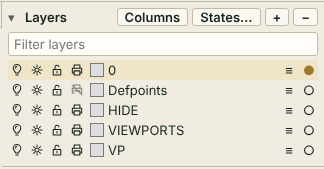
Each row
From left to right a row holds:
- On/off - turns the layer on or off. Objects on an off layer are hidden.
- Freeze/thaw - a frozen layer is hidden like an off layer.
- VP - freezes the layer in the current layout viewport only (see Layouts and viewports). It appears only while you are inside a viewport.
- Lock - you can see locked objects but not change them.
- Plot - a layer set to not plot is drawn on screen but left out of printing and PDF output.
- Colour swatch - click it to choose the layer colour.
- Name - double-click it, or select the row and press F2, to rename. Enter accepts and Esc cancels. Layer 0 cannot be renamed.
- Linetype, lineweight and transparency - the small button opens a dialog for all three. Transparency runs from 0 to 90 %.
- Make current - the circle at the end of the row. New objects go on the current layer, marked with a dot.
Columns in the header shows linetype, lineweight and transparency as columns.
Tip
Right-click a row for Rename, Make current and Linetype / lineweight....
Header buttons
- Columns - show or hide the extra columns.
- States... - opens the layer state manager. See Layer states.
- + - asks for a name and adds a layer.
- - - deletes the current layer, but only if it holds no objects. Layer 0 can never be deleted.
Type in the Filter layers box to list only layers whose name contains your text; the x button clears it. The filter changes the list only, not the drawing.
Quick Access layer combo
The layer drop-down in the Quick Access row shows the current layer. With objects selected it shows their layer instead, or (varies) when they are on different layers. Picking a layer while objects are selected moves them to it as one undo step; with nothing selected it makes that layer current.
Layer commands
Select objects first for these three:
LAYISO- keep the layers of the selected objects on and turn all others off.LAYFRZ- freeze the layers of the selected objects.LAYMCUR- make the layer of one selected object current.
These three need no selection:
LAYUNISO- restore the layers as they were beforeLAYISO.LAYON- turn every layer on.LAYTHW- thaw every layer.
See also Properties panel, Layer states and the Command reference.
In the app: Help ▸ Show me - In the app: Help ▸ Show me - In the app: Help ▸ Show me